

A HammerDB performance profile shows how a database scales on a system as virtual users increase.
That profile is important because database performance is not a single point. It is a curve. A system may scale cleanly at lower load, flatten at higher load, or reach a point where adding more users no longer increases throughput.
HammerDB has always supported performance profiles. What is new in HammerDB v6.0 is the ability to compare one performance profile against another.
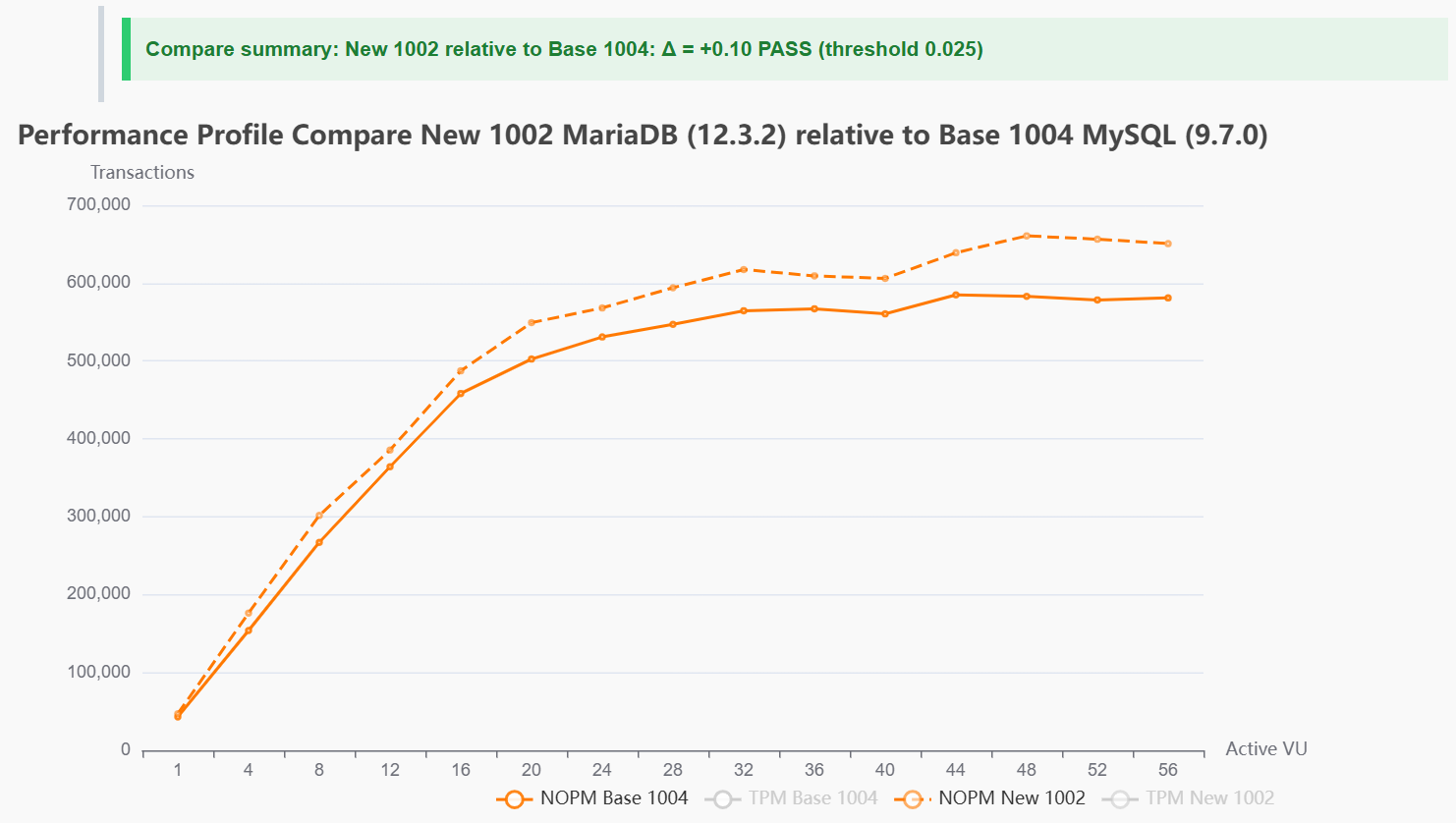
A saved baseline profile can now be compared with a new run, showing the difference across the full workload curve. That makes changes easier to review when testing database versions, configuration changes, platform updates or new builds.
Instead of looking at two separate profile runs side by side, HammerDB v6.0 shows the comparison directly. The result makes it clear where the new run is ahead, where it is behind, and how the difference changes as load increases.
HammerDB v6.0 also adds a comparison summary with a threshold, so a profile comparison can be marked as pass or fail against an expected level of change.
With profile comparison, HammerDB v6.0 shows how the new run behaves against the baseline at each stage of the workload, not just whether the peak number changed.
That gives a practical way to use HammerDB profiles for repeatable regression checks, release validation and performance tracking.
HammerDB v6.0 makes performance profile comparison easier to review, explain and repeat.